
Daily step · 3 · Claude from Zero
Talk instead of typingSay it all out loud, and Claude makes a to-do list
Want this guide as a PDF to keep? Leave your email and we'll send it right away, plus the next step every morning.
We'll email you the PDF, then one step every morning, plus the next guides, tips and updates from Team in a Box. Unsubscribe anytime.
Want this guide as a PDF to keep? Leave your email and we'll send it right away, plus the next step every morning.
We'll email you the PDF, then one step every morning, plus the next guides, tips and updates from Team in a Box. Unsubscribe anytime.
Your screen may look a little different (for example, the name under the message box). That's fine. Don't have a Claude account yet? Guide 1 covers everything. Tap any screenshot to see it bigger.
You don't have to type. The message box has a microphone: tap it, talk the way you normally talk, and the words type themselves. No need to organize anything. Claude does the organizing.
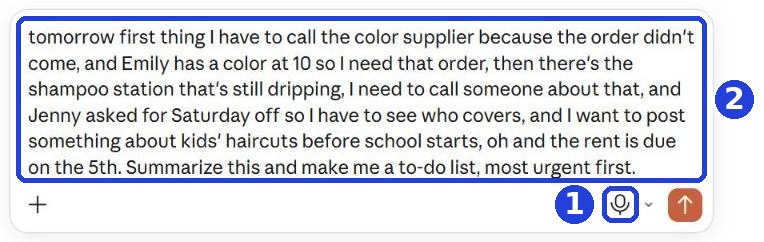
Tap the microphone and talk
In the message box, tap the microphone icon (1), and say everything on your mind. What you say is written in the box (2).
- The first time, you'll be asked whether to let Claude use the microphone. Tap Allow.
- When you're done talking, tap the microphone again (or the button that shows up in its place to finish), and the words stay in the box.
- If there's a button with a few vertical lines next to the microphone, it opens a voice conversation. That's something else; don't tap it here.
- Sometimes a word is heard wrong. Read what was written before you send.
At the end, add this sentence (by voice or by typing), and click the orange arrow:
Summarize this and make me a to-do list, most urgent first.
After you tap "Copy": click inside Claude's message box and paste. On a phone: press and hold in the box, then tap "Paste". On a computer: Ctrl+V (on a Mac: Command+V).
No microphone in the box? On a phone you can use the keyboard's microphone (the microphone icon on the keyboard).
Get a summary and a neat list
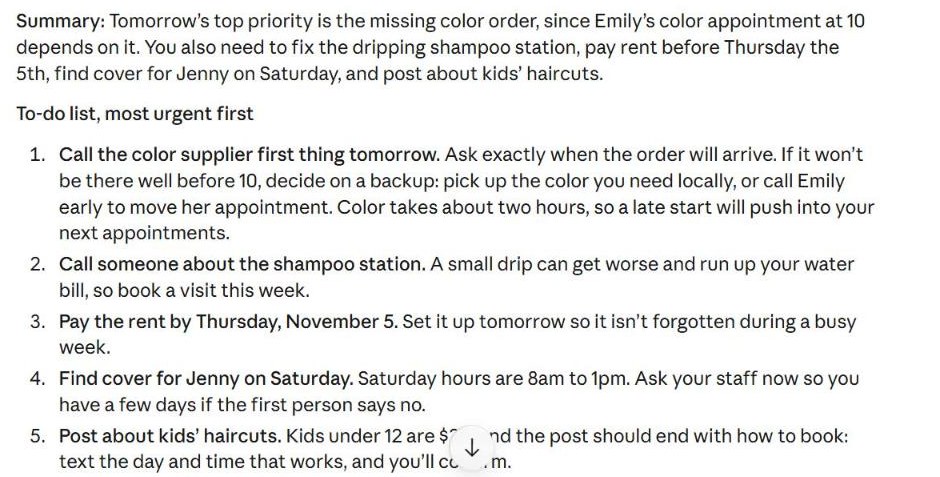
Claude writes a short summary, and lists the tasks, most urgent first.
Want every prompt and file from all chapters in one place? The full pack, $1.99.
This page's PDF is free, for your email. The pack = every chapter and step, a one-time payment.
Today's task
Tonight or tomorrow morning: tell Claude everything on your mind about your business, and add at the end "Summarize this and make me a to-do list, most urgent first." No need for customers' full names: a first name is enough.
Want this guide as a PDF to keep? Leave your email and we'll send it right away, plus the next step every morning.
The next step arrives tomorrow morning in your inbox.
We'll email you the PDF, then one step every morning, plus the next guides, tips and updates from Team in a Box. Unsubscribe anytime.
And for every prompt and file from all chapters in one place: the full pack, $1.99.
Don't want to wait?
All the steps, prompts and templates right now, in one place, ready to copy: $1.99.
Pay once. Yours for good, including everything we add.
Training material and tools, with no promise of income.
Secure payment through Polar. The link to the pack arrives right after payment, by email too. Full refund within 14 days.
More from this series
Your business's first website · Your first helper · All guides
Did this help? Share it with someone it will help, and get 50% of every purchase through you of one of our paid products (the full pack, the program or our done-for-you service): the ambassador program →