
Daily step · 5 · Claude from Zero
A negative reviewA calm, professional reply, without arguing
Your screen may look a little different (for example, the name under the message box). That's fine. Don't have a Claude account yet? Guide 1 covers everything. Tap any screenshot to see it bigger.
An unpleasant review hurts, and the first reply that comes to mind is usually not the one you post. Other customers read the reply too, not just the person who wrote the review. Claude writes a calm reply, and you choose, fix and post it.
Paste the review into Claude
- Open the review, signed in to your business account. On Google: search for your business name on Google or Maps, signed in to the business's Google account, and open the reviews (you can also use the Google Business Profile app, if you have it). On Facebook: on your business's Facebook page, in the Reviews tab.
- Copy its text. To select just part of it: on a phone, press and hold a word, then drag the handles. On a computer, drag with the mouse. Can't copy it? Type it.
- Paste it into Claude. Start a new chat in Claude (on a computer: the new chat button at the top of the side menu, called New chat or New; on a phone: the new chat button at the top), or open your business project, if you have one from guide 2. Paste the review into the message box.
Add the request
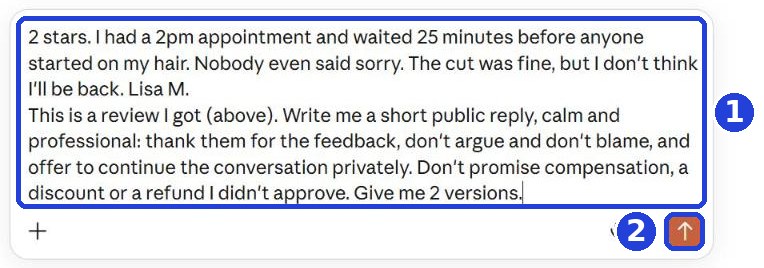
Copy this message. In Claude, click at the end of the text that's already in the box, go down a line, and paste it under the review:
This is a review I got (above). Write me a short public reply, calm and professional: thank them for the feedback, don't argue and don't blame, and offer to continue the conversation privately. Don't promise compensation, a discount or a refund I didn't approve. Give me 2 versions.
After you tap "Copy": click inside Claude's message box and paste. On a phone: press and hold in the box, then tap "Paste". On a computer: Ctrl+V (on a Mac: Command+V).
A new line in the box: on a phone, the Enter key. On a computer, Shift and Enter together, because Enter alone sends the message.
Click the orange arrow (2).
Pick a version, fill it in, and post it
Claude writes 2 versions. Pick one, then:
- Select just the text of the reply (without a heading like "Version 1" and without any notes under it), and copy it.
- Go back to the review, tap Reply under it, and paste.
- There, in the reply box, replace [name] with the first name of the person who wrote the review, along with anything else still in square brackets.
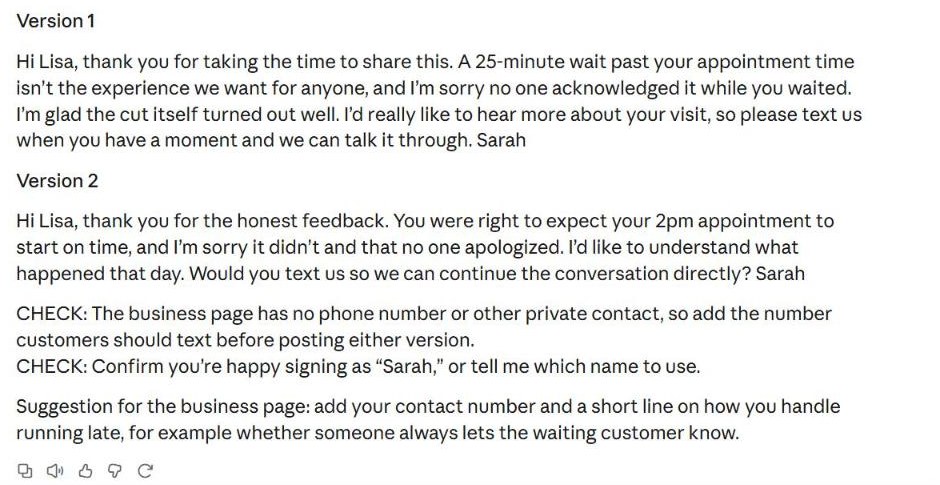
If Claude wrote "CHECK:", fill in what's missing (for example a phone number) before you post.
What you promise in the reply (a discount, a fix, a refund) is your decision, not Claude's. And don't write a customer's personal details in a public reply.
Today's task
Find one bad review you haven't answered yet. Ask for 2 versions, pick one, fill it in and post it. No review like that? Bookmark this page for next time.
Don't want to wait?
All the steps, prompts and templates right now, in one place, ready to copy: $1.99.
Pay once. Yours for good, including everything we add.
Training material and tools, with no promise of income.
Secure payment through Polar. The link to the pack arrives right after payment, by email too. Full refund within 14 days.
Want a new step every morning?
One small win a day, by email.
We'll email you the daily step every morning, plus the next guides, tips and updates from Team in a Box. Unsubscribe anytime.
More from this series
Your business's first website · Your first helper · All guides