
Daily step · 7 · Claude from Zero
A long document in plain EnglishWhat matters in it, and what to check before you sign
Your screen may look a little different (for example, the name under the message box). That's fine. Don't have a Claude account yet? Guide 1 covers everything. Tap any screenshot to see it bigger.
A supplier contract, a lease, the terms of a new service. Long documents that are easy to sign without reading to the end. Today Claude reads them with you and points out what matters: what you're committing to, which amounts and penalties it found, and what to ask before you sign.
Before you start: this isn't legal advice, and Claude can make mistakes. And if the document has a Social Security number or a bank account number, cover them (or delete them from the copy you upload) before uploading.
Attach the document
Start a new chat (on a computer: the new chat button at the top of the side menu, called New chat or New; on a phone: the pencil icon at the top), or open your business project, if you have one from guide 2.
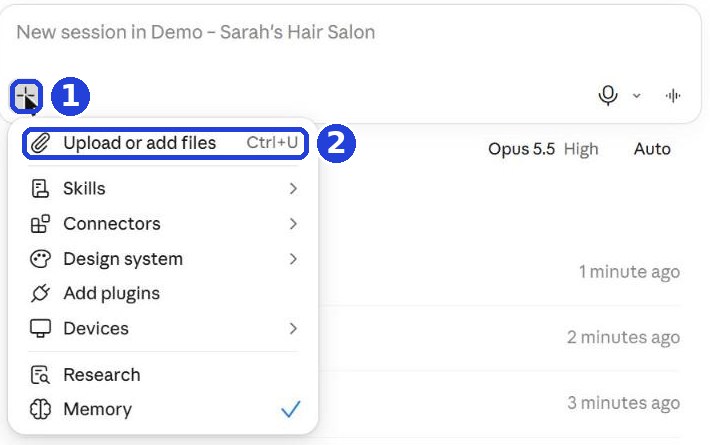
On a computer: click the plus (+) in the message box (mark 1 in the screenshot). In the menu that opens, choose the first line, with the paperclip icon (mark 2). For us it's called Upload or add files; yours may be named a little differently. Choose the file.
On a phone: tap the plus (+) next to the message box, and choose the file from your phone. Document only on paper? Photograph each page (straight, in good light), and attach all the photos to the same message.
A very long document, and Claude says you've reached a limit? That happens on the free plan. Upload only the pages with the terms and amounts, or continue when the limit resets (Claude tells you when).
Ask for a simple explanation
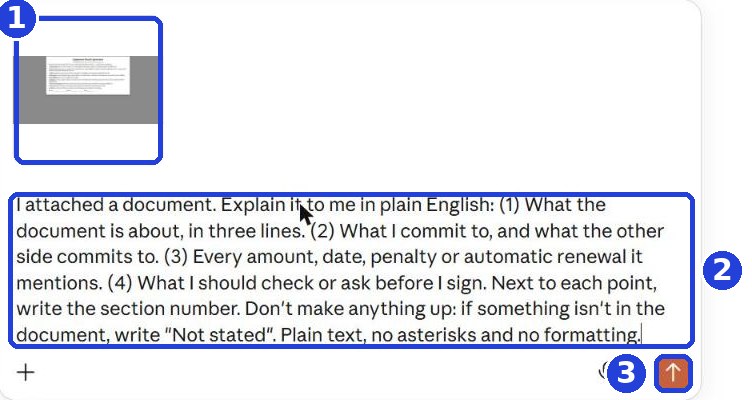
When the file shows up in the box (mark 1 in the screenshot), copy this message and paste it under it (mark 2):
I attached a document. Explain it to me in plain English: (1) What the document is about, in three lines. (2) What I commit to, and what the other side commits to. (3) Every amount, date, penalty or automatic renewal it mentions. (4) What I should check or ask before I sign. Next to each point, write the section number. Don't make anything up: if something isn't in the document, write "Not stated". Plain text, no asterisks and no formatting.
After you tap "Copy": click inside Claude's message box and paste. On a phone: press and hold in the box, then tap "Paste". On a computer: Ctrl+V (on a Mac: Command+V).
Click the orange arrow (mark 3).
Read the answer
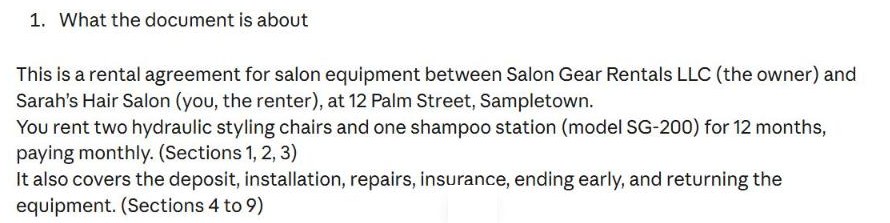
Claude explains what the document is about and who commits to what, and next to each point writes the section number, so you can check it in the document itself.
Claude writes the answer bit by bit. Wait until it finishes, then scroll down.
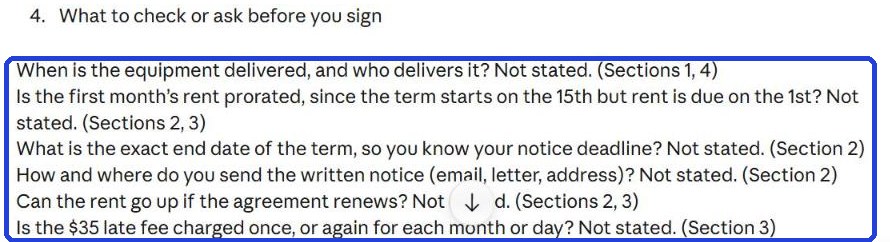
The most important part is at the end: what to check or ask before you sign (in our example: "What to check or ask before you sign").
Move to action
Once you understand it, ask Claude for a message to the other side. Copy and paste this into the box under the answer:
Write me a short, polite message to the other side, asking for the 3 most important changes before I sign. Just the message, with nothing before or after it. Plain text, no asterisks and no formatting.
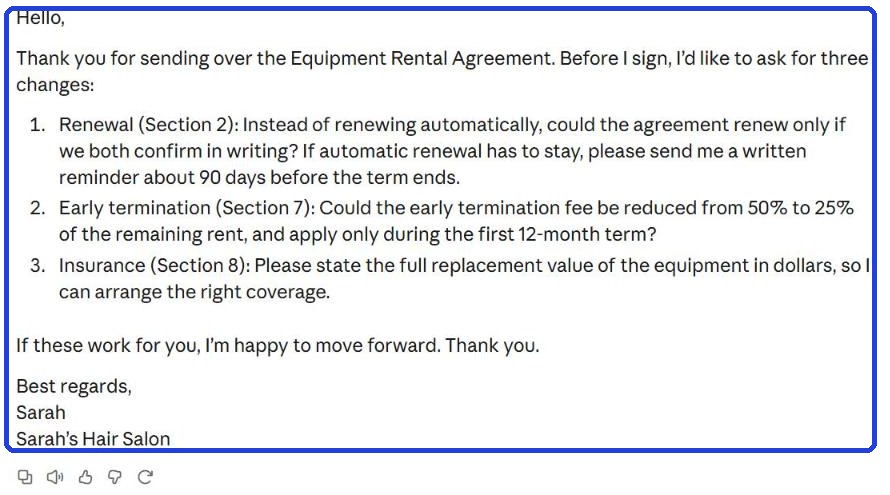
Under the answer, the first button on the left (an icon of two pages) copies it. Paste it into an email or a text, fix what's needed (for example the signature at the end), and send it.
For an important document (a loan, a long lease, a partnership), show it to a lawyer before you sign.
Today's task
Pick one document you signed or that's waiting for your signature: a supplier contract, a lease, the terms of an app you pay for. Upload it, read "What I should check or ask before I sign", and write down one question to ask.
Don't want to wait?
All the steps, prompts and templates right now, in one place, ready to copy: $1.99.
Pay once. Yours for good, including everything we add.
Training material and tools, with no promise of income.
Secure payment through Polar. The link to the pack arrives right after payment, by email too. Full refund within 14 days.
Want a new step every morning?
One small win a day, by email.
We'll email you the daily step every morning, plus the next guides, tips and updates from Team in a Box. Unsubscribe anytime.
More from this series
Your business's first website · Your first helper · All guides