
Daily step · 11 · Claude from Zero
A script for a reelWhat to film, what to say, and what to put on screen
Your screen may look a little different (for example, the name under the message box). That's fine. Don't have a Claude account yet? Guide 1 covers everything. Tap any screenshot to see it bigger.
Want to film a short video for a reel or a story, but your mind goes blank in front of the camera? Today Claude writes you a script: for each segment, what to film, what to say and what to put on screen. You just film it on your phone.
Ask for a script
Start a new chat (on a computer: the new chat button at the top of the side menu, called New chat or New; on a phone: the pencil icon at the top), or open your business project, if you have one from guide 2.
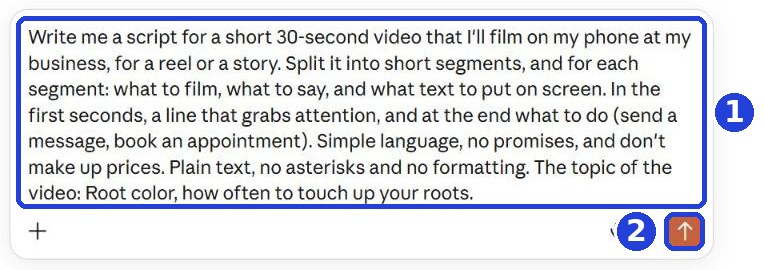
Copy the message and paste it. At the end of the message, after the colon, write the topic of the video, for example one tip your customers ask about:
Write me a script for a short 30-second video that I'll film on my phone at my business, for a reel or a story. Split it into short segments, and for each segment: what to film, what to say, and what text to put on screen. In the first seconds, a line that grabs attention, and at the end what to do (send a message, book an appointment). Simple language, no promises, and don't make up prices. Plain text, no asterisks and no formatting. The topic of the video:
After you tap "Copy": click inside Claude's message box and paste. On a phone: press and hold in the box, then tap "Paste". On a computer: Ctrl+V (on a Mac: Command+V).
Click the orange arrow (mark 2 in the screenshot).
Read the script
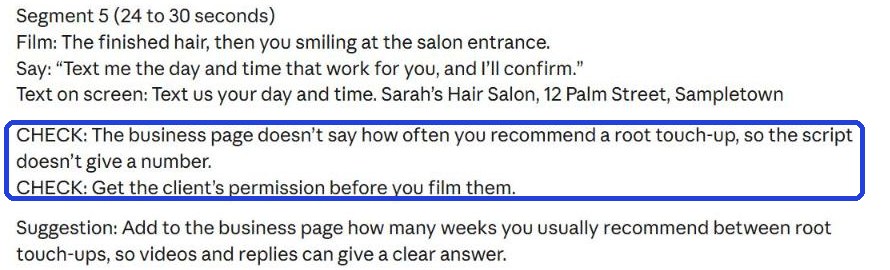
Claude splits the video into short segments. For each one: what to film, what to say, and what to put on screen.
Claude writes the answer bit by bit. Wait until it finishes, then scroll down.

At the end of the script: what the viewer should do (for example, send a message). If Claude adds filming tips or a "CHECK:" line (in the frame), read them. "CHECK:" is what you fill in or decide yourself before you film, for example how many weeks between touch-ups. And if it says "close-up": film up close.
Film it
The first button on the left under the answer (an icon of two pages) copies the whole script. Paste it into a note on your phone, and film segment by segment. Worked on a computer? The simplest way: open Claude on your phone, with the same account, and open the same chat. Or email the script to yourself.
You can film each segment separately and put them together in the app where you post (Instagram or TikTok): film a segment there, stop, and film the next.
Too long? Write under the answer:
Shorten the script to 15 seconds, with only two segments.
Add the "on screen" text in the app where you post the video (the text button, usually Aa). And if you film customers, ask their permission first.
Today's task
Pick one topic, ask for a script, and film only the first segment. You can stop there and continue tomorrow.
Don't want to wait?
All the steps, prompts and templates right now, in one place, ready to copy: $1.99.
Pay once. Yours for good, including everything we add.
Training material and tools, with no promise of income.
Secure payment through Polar. The link to the pack arrives right after payment, by email too. Full refund within 14 days.
Want a new step every morning?
One small win a day, by email.
We'll email you the daily step every morning, plus the next guides, tips and updates from Team in a Box. Unsubscribe anytime.
More from this series
Your business's first website · Your first helper · All guides