
Daily step · 12 · Claude from Zero
A small calculatorCustomers choose, and see an estimated price
Want this guide as a PDF to keep? Leave your email and we'll send it right away, plus the next step every morning.
We'll email you the PDF, then one step every morning, plus the next guides, tips and updates from Team in a Box. Unsubscribe anytime.
Want this guide as a PDF to keep? Leave your email and we'll send it right away, plus the next step every morning.
We'll email you the PDF, then one step every morning, plus the next guides, tips and updates from Team in a Box. Unsubscribe anytime.
Your screen may look a little different (for example, the name under the message box). That's fine. Don't have a Claude account yet? Guide 1 covers everything. Tap any screenshot to see it bigger.
"About how much will it be?" Today Claude builds you a small calculator that works in a browser: the customer checks what they want and sees an estimated price. Like the page from guide 3, only this time you click on it and it calculates.
It works best in your business project from guide 2, because there Claude already knows your prices. No project? Skip to the second box, under the screenshot.
Ask for a calculator
Have a project? Open it (on a computer: Projects in the side menu, then your project; on a phone: the button with the lines at the top corner, then Projects and the project). Copy and paste. At the end of the message, after the colon, write what the calculator should calculate:
Build me a small calculator that works in a browser, that my customers can use. Use only the prices you have. Anything without a written price, leave out. Clean design that looks good on a phone too. At the end, a small line: "Estimated price. The final price is confirmed in person." What the calculator should calculate:
After you tap "Copy": click inside Claude's message box and paste. On a phone: press and hold in the box, then tap "Paste". On a computer: Ctrl+V (on a Mac: Command+V).
Click the orange arrow (mark 2 in the screenshot).
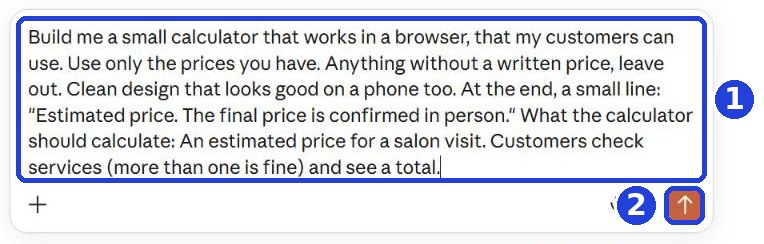
No project? Start a new chat, and copy this message. At the end, write what the calculator should calculate, and the prices:
Build me a small calculator that works in a browser, that my customers can use. Use only the prices I write here at the end, and don't make up prices. Clean design that looks good on a phone too. At the end, a small line: "Estimated price. The final price is confirmed in person." What the calculator should calculate, and the prices:
An example of the end of the message: "An estimated price for a visit. Women's haircut $65, men's haircut $35, root color from $90. Customers check services (more than one is fine) and see a total." Yours: your own services and prices. Then click the orange arrow.
The calculator is ready
Claude builds it, and the calculator opens on the side (on a computer). On a phone it shows up as a card inside the reply: tap it to open. Building can take a bit longer than a regular answer: wait until it finishes.
Claude wrote that it has no prices? Paste them into the box and send. And if you see a message that you've reached a limit on the free plan, it's not a bug: continue in the same chat when it resets (it says when).
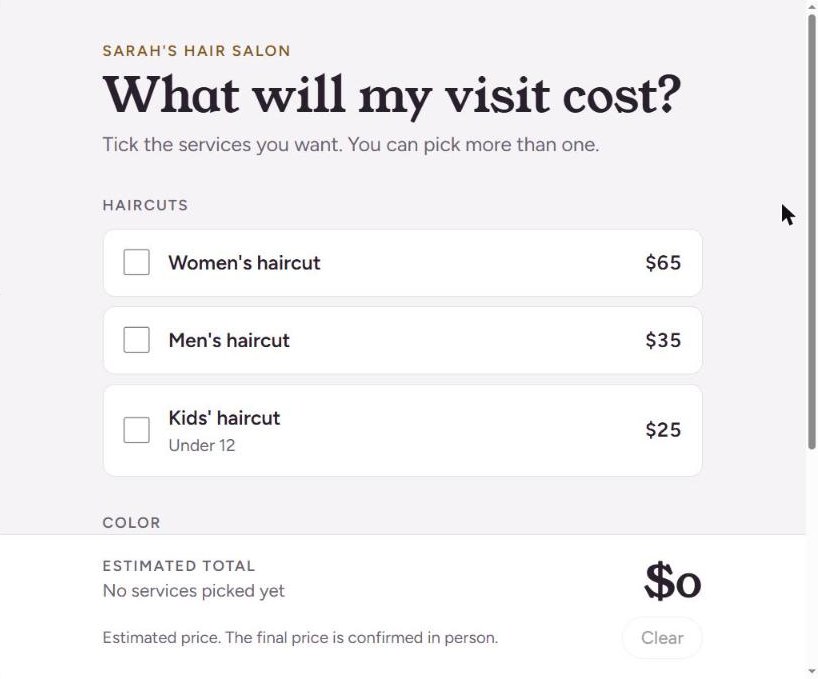
Test it yourself: check a service or two (1), and see the total at the bottom (2).
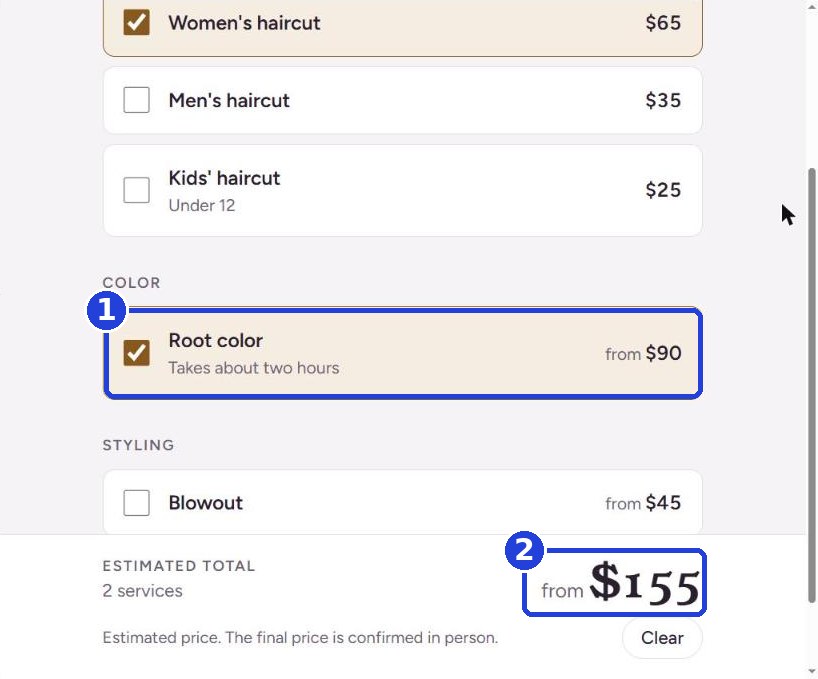
Something wrong? Write to Claude underneath, like you would to a person: "A blowout is $50", "Add a bridal updo". Want a booking button? Write this under the answer, with your business number at the end:
Add a "Text us to book" button to the calculator that opens a text message to this number:
For example, at the end: (555) 014-2386. That's a made-up number; write your real one.
Send it to customers
Just like the page from guide 3, in the step "Send it to your customers" (it has screenshots for every click):
- On the free plan: download the calculator as a file: click Share above the calculator (on a phone: the arrow pointing up), then the Export tab, and the download arrow next to HTML. Email the file to the customer as an attachment (in a text message, some phones won't open it). The customer opens it, and it usually opens in the browser and works. A customer can't open it? Text them the prices instead. A screenshot doesn't work here: you can't click on a picture.
- A link to send or put in your bio (on your social profiles): with a paid Claude plan, or through Netlify from a computer. Both ways are explained in guide 3.
Send it to yourself first and check that the file opens and calculates. Added a "Text us to book" button? Test it from the file on your phone: tap it and check that a text to the right number opens (don't send anything). No HTML in the window? Write to Claude "Rebuild it as one HTML file".
Before you send it: check every price in the calculator against your price list. The calculator shows an estimated price only, and what you actually charge is up to you.
Want every prompt and file from all chapters in one place? The full pack, $1.99.
This page's PDF is free, for your email. The pack = every chapter and step, a one-time payment.
Today's task
Ask for a calculator for one or two services, and check every price. Send it to yourself first, and check that it opens and calculates. Then send it to one customer who asked for a quote this week.
Want this guide as a PDF to keep? Leave your email and we'll send it right away, plus the next step every morning.
The next step arrives tomorrow morning in your inbox.
We'll email you the PDF, then one step every morning, plus the next guides, tips and updates from Team in a Box. Unsubscribe anytime.
And for every prompt and file from all chapters in one place: the full pack, $1.99.
Don't want to wait?
All the steps, prompts and templates right now, in one place, ready to copy: $1.99.
Pay once. Yours for good, including everything we add.
Training material and tools, with no promise of income.
Secure payment through Polar. The link to the pack arrives right after payment, by email too. Full refund within 14 days.
More from this series
Your business's first website · Your first helper · All guides
Did this help? Share it with someone it will help, and get 50% of every purchase through you of one of our paid products (the full pack, the program or our done-for-you service): the ambassador program →