
Daily step · 14 · Claude from Zero
What the competitor offersWhat they do well, what's missing, and what you can do differently
Your screen may look a little different (for example, the name under the message box). That's fine. Don't have a Claude account yet? Guide 1 covers everything. Tap any screenshot to see it bigger.
Is there a similar business down the street, or on Instagram, that everyone talks about? Today Claude reads their page and explains: what they offer, what they do well, what's missing, and 3 ideas for what you can do differently. In your business project from guide 2, Claude may also compare it to your Business page.
Copy the competitor's page
Open the competitor's website or page. Only what's open to everyone: what anyone can see, without signing in and without a password. The services, prices and description are enough. You don't need to copy reviews with customers' names.
On a computer: select the text with the mouse (or Ctrl+A for the whole page; on a Mac: Command+A), and copy (Ctrl+C; on a Mac: Command+C). On a phone: press and hold the text, then "Select all", then "Copy".
Copy the text itself, not the link to the page. That way Claude reads exactly what you see.
Paste it, and add the request
Start a new chat (on a computer: the new chat button at the top of the side menu, called New chat or New; on a phone: the pencil icon at the top), or open your business project, if you have one from guide 2.
Click inside the message box and paste the text (on a phone: press and hold in the box, then "Paste". On a computer: Ctrl+V, on a Mac: Command+V). Long text may show up after pasting as a small square above the box. That's fine: then just paste the message below into the box itself.
Important: on a computer, Enter alone sends the message. To go down a line, press Shift and Enter together. On a phone, the Enter key goes down a line. Sent it by mistake before you were done? No big deal: paste the rest in the next message.
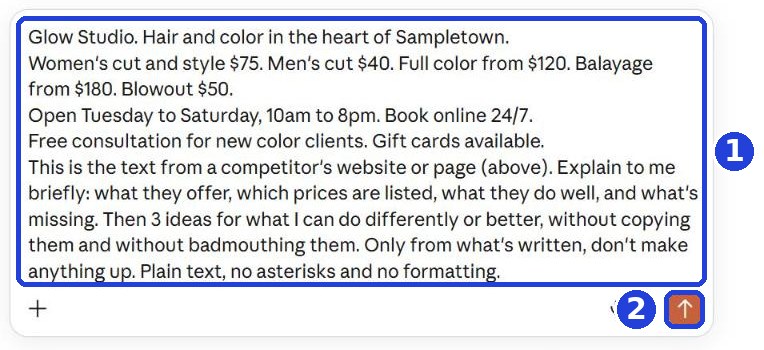
Go down a line under the text, copy this message and paste it:
This is the text from a competitor's website or page (above). Explain to me briefly: what they offer, which prices are listed, what they do well, and what's missing. Then 3 ideas for what I can do differently or better, without copying them and without badmouthing them. Only from what's written, don't make anything up. Plain text, no asterisks and no formatting.
After you tap "Copy": click inside Claude's message box and paste. On a phone: press and hold in the box, then tap "Paste". On a computer: Ctrl+V (on a Mac: Command+V).
Click the orange arrow (mark 2 in the screenshot).
An Instagram page, or can't select the text? Take screenshots of the page (a few is fine). In Claude, click the plus (+) in the message box, choose to upload a photo or file, and select the screenshots. Then copy and paste this message instead of the first one:
These are screenshots of a competitor's page. Explain to me briefly: what they offer, which prices are listed, what they do well, and what's missing. Then 3 ideas for what I can do differently or better, without copying them and without badmouthing them. Only from what's written, don't make anything up. Plain text, no asterisks and no formatting.
Read and decide
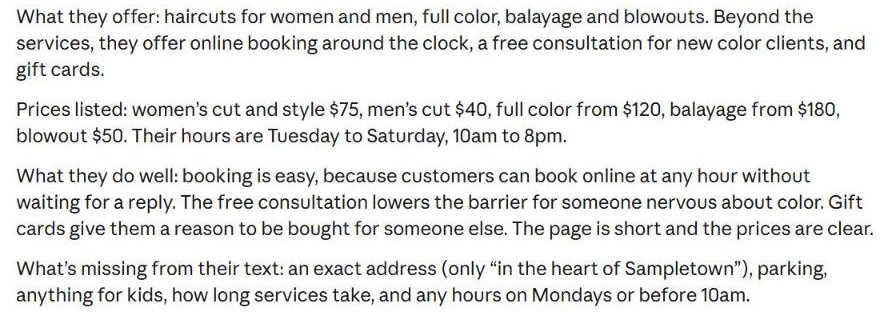
Claude explains what the competitor offers, which prices are listed, what they do well, and what's missing.
Claude writes the answer bit by bit. Wait until it finishes, then scroll down.
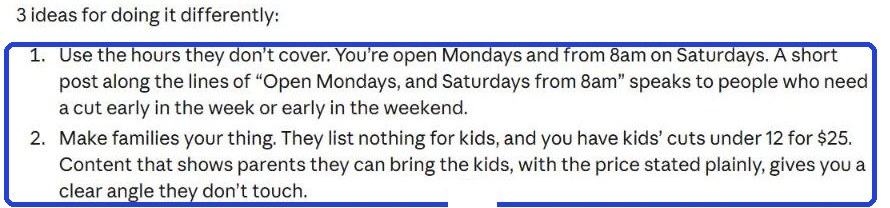
At the end: 3 ideas for what you can do differently (in the blue frame in the screenshot).
Don't copy the competitor's texts or photos, and don't write about them online: learn, and do better.
Today's task
Pick one competitor, paste their page, and choose one of the 3 ideas to try this week.
Don't want to wait?
All the steps, prompts and templates right now, in one place, ready to copy: $1.99.
Pay once. Yours for good, including everything we add.
Training material and tools, with no promise of income.
Secure payment through Polar. The link to the pack arrives right after payment, by email too. Full refund within 14 days.
Want a new step every morning?
One small win a day, by email.
We'll email you the daily step every morning, plus the next guides, tips and updates from Team in a Box. Unsubscribe anytime.
More from this series
Your business's first website · Your first helper · All guides