
Daily step · 19 · Claude from Zero
What else you can doFrom one helper to a small team
Your screen may look a little different (for example, the name under the message box). That's fine. Don't have a Claude account yet? Guide 1 covers everything. Tap any screenshot to see it bigger.
You've reached the last step. If you did the earlier steps, you already have: a business project with your Business page, your voice page and the questions that keep coming. Texts to customers, posts, review replies, messages to suppliers, scripts, a cash flow table (how much money you'll have each day), a price calculator for customers, and a designed card for a post. All of it with one helper.
Today you see the next step: a small team. Instead of one helper that does everything, a few helpers, each with its own role.
Pick a type of business
Go to getteaminabox.com, our free tool. Scroll down to "What kind of business do you have?", and click the type closest to your business. Can't find it? "Other business". No business yet? "No business yet".
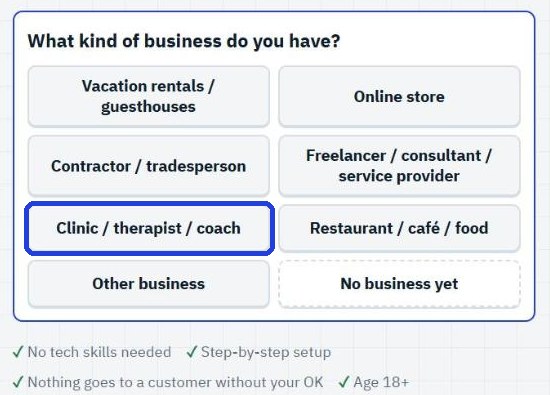
See the team
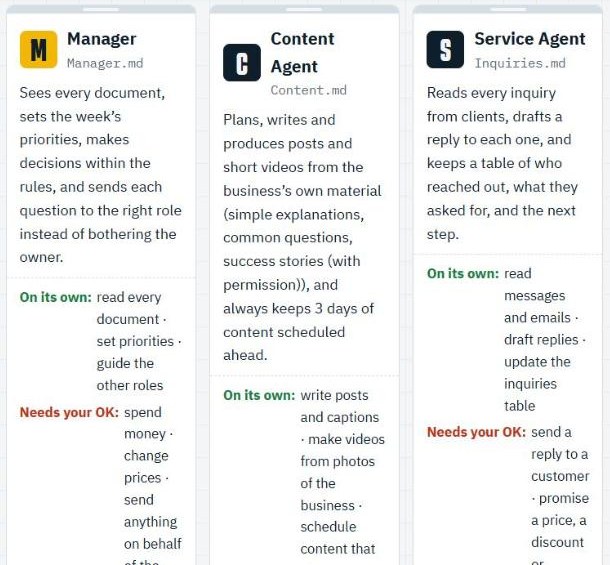
Four assistants appear: Manager, Content, Customer Service and Sales. Above them there's a box to get it all by email (you don't have to fill it in to see them): scroll down a little. For each one it says what it does, what it may do on its own (in green, "On its own:") and what needs your OK (in red, "Needs your OK:").
Want to run them in Claude? On the same page, leave your email, and get the instructions for each assistant for free, ready to copy, with step-by-step explanations.
This is the last step in the series. And from here? The emails continue: how to connect the assistants to each other, so each one knows what the other did.
Today's task
Pick a type of business in the tool, and read what each of the 4 assistants does. Note which one you're missing most right now.
Don't want to wait?
All the steps, prompts and templates right now, in one place, ready to copy: $1.99.
Pay once. Yours for good, including everything we add.
Training material and tools, with no promise of income.
Secure payment through Polar. The link to the pack arrives right after payment, by email too. Full refund within 14 days.
Want the series from the start?
One small step every morning, by email, starting with step 1.
We'll email you the daily step every morning, plus the next guides, tips and updates from Team in a Box. Unsubscribe anytime.
More from this series
Your business's first website · Your first helper · All guides