
Free guide · Claude from Zero · Guide 5
A clear price quoteFrom a customer's question to a quote that looks professional
Your screen may look a little different (for example, the name under the message box). That's fine. These screenshots are from a computer; on a phone everything is in the same order, just arranged differently. Click any screenshot to see it bigger.
A customer asks "how much will it be?", and you add it up in your head, type it into a text, and forget something. In this guide Claude makes a clear quote from the prices in your project, marks what's missing instead of making it up, and builds a page from it that looks professional.
Ask for a price quote
No business project? Skip to the "No project?" box below.
Have a business project? Open your business project from guide 2 (on a computer: in the side menu; on a phone: the button with the lines at the top corner, then Projects and your project). The project page has a message box: anything you write there starts a new chat inside the project, and Claude already knows what you saved in it.
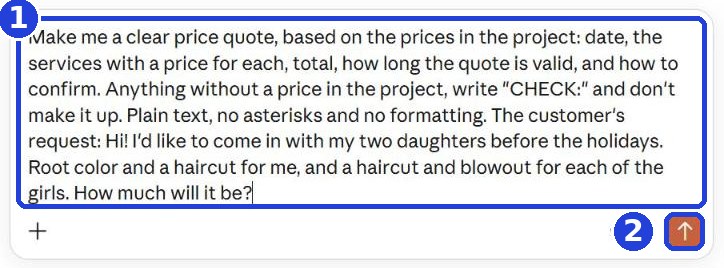
The order matters, because you can only copy one thing at a time. First, copy the message from here and paste it into the box in Claude. Second, go to your texts and copy the customer's message (on a phone: press and hold the message, then "Copy"; on a computer: select it, then Ctrl+C, or Command+C on a Mac). Third, go back to Claude, tap at the very end of the text, and paste it after the colon (1). Nothing to copy, or the texts are on your phone and you're on a computer? Just type at the end what the customer asked for. Click the arrow (2).
Selling parts, labor or anything taxed? After the customer's request, type: "Add parts, labor and sales tax if they apply." Some states have rules for written estimates: check yours.
Make me a clear price quote, based on the prices in the project: date, the services with a price for each, total, how long the quote is valid, and how to confirm. Anything without a price in the project, write "CHECK:" and don't make it up. Plain text, no asterisks and no formatting. The customer's request:
After you tap "Copy": click inside Claude's message box and paste. On a phone: press and hold in the box, then tap "Paste". On a computer: Ctrl+V (on a Mac: Command+V).
No project? Start a new chat (on a computer: New chat or New at the top of the side menu; on a phone: the pencil icon at the top). First type your prices in the box, one line per service (or paste them, if you have them saved). Go down a line, and only then copy this message and paste it under them. At the end, paste or type the customer's request, as above.
A new line in the box: on a phone, the Enter key. On a computer, Shift and Enter together, because Enter alone sends the message.
These are my business's prices (above). Make me a clear price quote, based on the prices I wrote: date, the services with a price for each, total, how long the quote is valid, and how to confirm. Anything without a price on my list, write "CHECK:" and don't make it up. Plain text, no asterisks and no formatting. The customer's request:
Check the quote
Claude writes a quote: date, the services, the total, how long it's valid and how to confirm. Check the total (in the frame): every price against your price list.
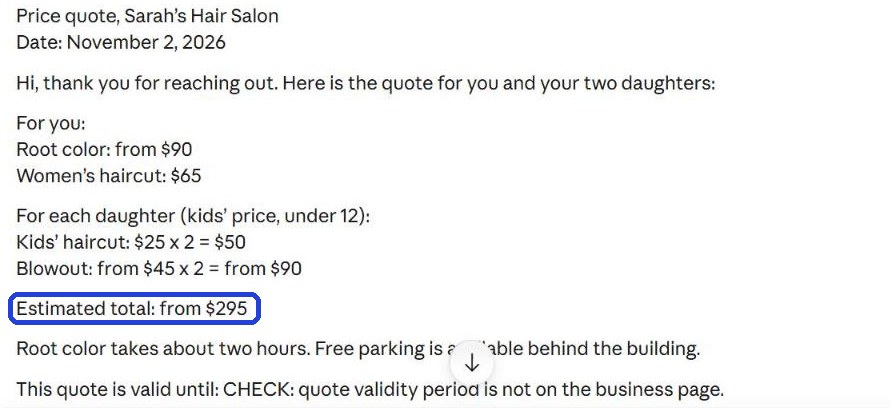
Under the quote, Claude wrote what's missing (in the frame). Here the price for the girls depends on their age, so Claude asked instead of guessing. Answer all of them in your next message, including how long the quote is valid, for example "The girls are 8 and 10. The quote is valid for 14 days." Not sure about one? Write "leave it out". Claude fixes the quote.
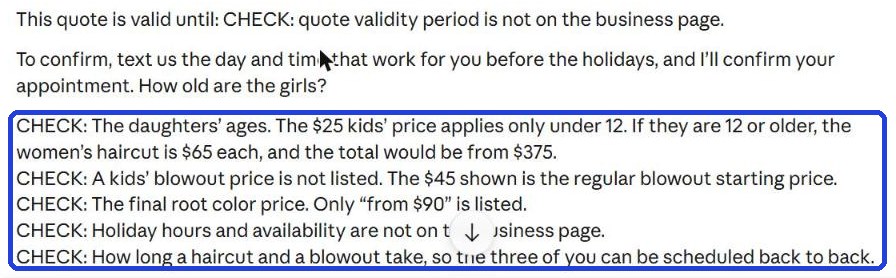
"CHECK:" lines are things Claude didn't find in your project, so it didn't make them up. Answer them in your next message, or fix them yourself. Don't post or send anything you haven't checked.
A designed page to send by text
The text is ready and checked? In the same chat, ask for a designed page (1), and send (2). Still have CHECK answers? Type them first in the box, then paste this after them:
Build the quote as one designed page too, like a price list, that I can save as an image and send by text.

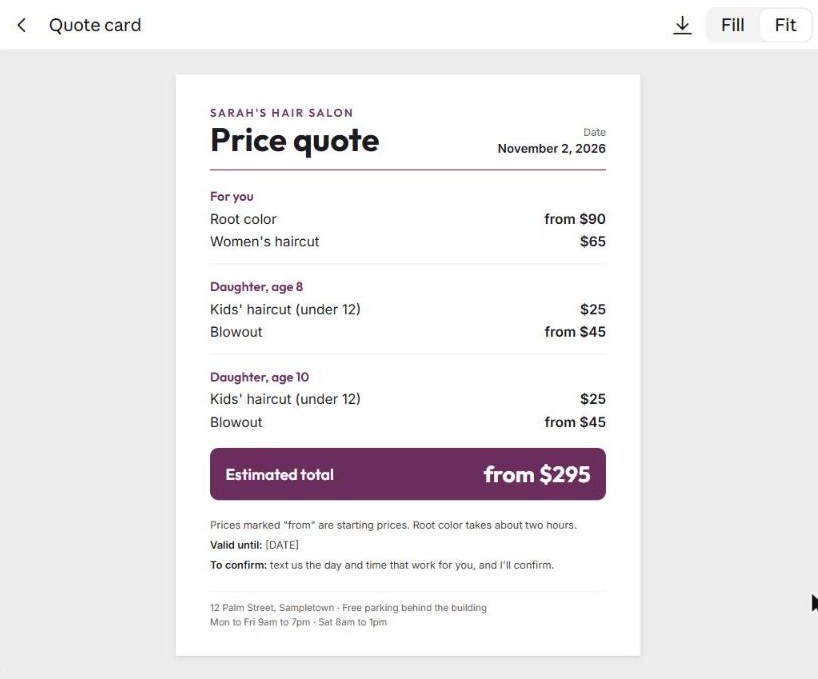
Claude designs it, and the page opens on the side (on a computer). On a phone it shows up as a card inside the reply: tap it to open, and go back to the chat with the back arrow at the top. Wait until Claude finishes. See code instead of a page? Write "Show me the page, not the code".
No page at all? That's fine: you can send the quote from step 2 as a text. To send the quote as text: The first button on the left under the answer (an icon of two pages; scroll to the end of the answer) copies the whole answer, including Claude's notes, so don't copy with it right away. The simplest way: first read and answer the "CHECK:" lines, if there are any. Then write to Claude "Just the quote for the customer, with nothing before or after it", and copy the new answer with the same button. You can also select it yourself: on a computer, drag the mouse from the start of the text to the end and press Ctrl+C (on a Mac: Command+C); on a phone, press and hold a word, drag the handles to the end of the text, then "Copy".
Want a change? Write it underneath, like you would to a person: "In my business colors, navy and white", "Add the address at the bottom".
Save it as an image and send it
The simplest way, and it works on every plan and every phone: take a screenshot of the page.
- iPhone: press the side button and the volume up button together (iPhone with a Home button: Home and the side button).
- Android: press the power button and the volume down button together.
- Windows computer: press the Windows key (the one with the Windows logo, between Ctrl and Alt), Shift and S together, and drag over just the page. The screenshot is copied: paste it into an email with Ctrl+V.
- Mac: press Command, Shift and 4 together, and drag over just the page. The screenshot is saved on your desktop.
On a phone, the screenshot captures the whole screen: open it in Photos, tap Edit, then Crop, and drag the corners until only the page is left. Page longer than the screen? Write to Claude "Make the page shorter so it fits on one screen". On a computer you can also download it as an image (below), and then it's saved whole.
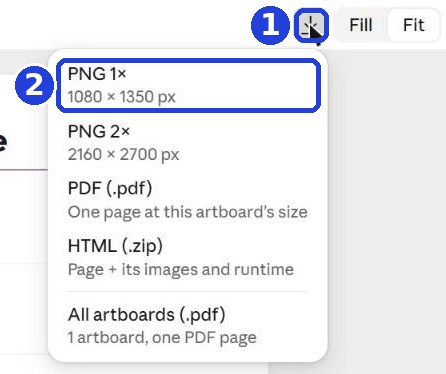
Is there a download button above the page (the arrow pointing down, 1)? Click it and choose PNG 1× (2): that's a regular image.
On a phone: in your texts, in the chat with the customer, attach the image (the plus or the photo icon, then choose the image), and send. You can add a line of your own: "Here's the quote, just reply to confirm".
On a computer: email the image to the customer as an attachment. Or email it to yourself, open the email on your phone, save the image (press and hold it, then "Save"), and send it in a text. On a Mac with Messages, you can also drag the image into the chat.
The customer didn't answer? A follow-up
Two days and no answer? Go back to the quote chat: open the project (on a computer: in the side menu; on a phone: the button with the lines at the top corner, then Projects and your project. On a computer you can also click the project name at the top of the chat), and the project page lists its chats. No project? Look in the side menu, under your recent chats. Can't find it? Start a new chat (in the project, if you have one), and first write in a few words what you quoted and for how much. Go down a line, then copy and paste:
The customer hasn't answered for two days. Write me a short, friendly follow-up text, in my voice, that mentions the quote and asks if they have any questions. No pressure, and no discount I didn't ask for.
Claude writes a short message that mentions the quote. Copy it and send it to the customer. More ideas for messages like this are in guide 2.
Keep in mind: Claude takes the prices from what's in your project. A price changed? Add a "Price update" document to the project (on the project page, next to Context: Add → Add text content, as shown in guide 4, step 2), with something like "Color now starts at $95. The new price replaces the old one." That way every quote after that comes out right.
A message that you've reached a usage limit (it happens on the free plan)? Wait until the time it shows, then continue in the same chat.
Claude can make mistakes, in math too. Check every price and the total before you send, and don't promise the customer anything you haven't decided on.
Don't want to wait?
All the steps, prompts and templates right now, in one place, ready to copy: $1.99.
Pay once. Yours for good, including everything we add.
Training material and tools, with no promise of income.
Secure payment through Polar. The link to the pack arrives right after payment, by email too. Full refund within 14 days.
Want the next guide? We'll email it to you.
We'll email you the next guides, tips and updates from Team in a Box. Unsubscribe anytime.
Earlier guides
Guide 1 · Set up Claude the right way · Guide 2 · Your first helper · Guide 3 · Your business's first website · Guide 4 · Your content helper · All guides
All the guides: getteaminabox.com/guides