
Daily step · 16 · Claude from Zero
A simple design for a postA square card with your text, ready to post
Want this guide as a PDF to keep? Leave your email and we'll send it right away, plus the next step every morning.
We'll email you the PDF, then one step every morning, plus the next guides, tips and updates from Team in a Box. Unsubscribe anytime.
Want this guide as a PDF to keep? Leave your email and we'll send it right away, plus the next step every morning.
We'll email you the PDF, then one step every morning, plus the next guides, tips and updates from Team in a Box. Unsubscribe anytime.
Your screen may look a little different (for example, the name under the message box). That's fine. Don't have a Claude account yet? Guide 1 covers everything. Tap any screenshot to see it bigger.
Want to post an offer, new hours or an announcement, and don't have a fitting photo? Today Claude designs a square card for a post, with exactly your text. Claude doesn't take photos or create images of people: it designs with text, colors and simple shapes.
Ask for a card
Start a new chat (on a computer: the new chat button at the top of the side menu, called New chat or New; on a phone: the pencil icon at the top), or open your business project, if you have one from guide 2.
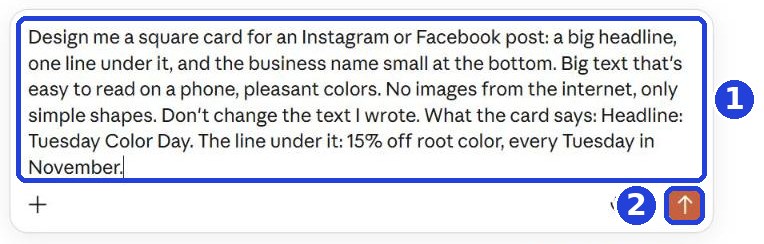
Copy the message and paste it. At the end of the message, after the colon, write what goes on the card: a headline, one line, and the business name:
Design me a square card for an Instagram or Facebook post: a big headline, one line under it, and the business name small at the bottom. Big text that's easy to read on a phone, pleasant colors. No images from the internet, only simple shapes. Don't change the text I wrote. What the card says:
After you tap "Copy": click inside Claude's message box and paste. On a phone: press and hold in the box, then tap "Paste". On a computer: Ctrl+V (on a Mac: Command+V).
Click the orange arrow (mark 2 in the screenshot).
The card is ready
Claude designs it, and the card opens on the side (on a computer). On a phone it shows up as a card inside the reply: tap it to open, and go back to the chat with the back arrow at the top. Wait until Claude finishes. Claude asked a question instead of designing? Answer briefly, or write "You decide". See code instead of a card? Write "Show me the card, not the code".
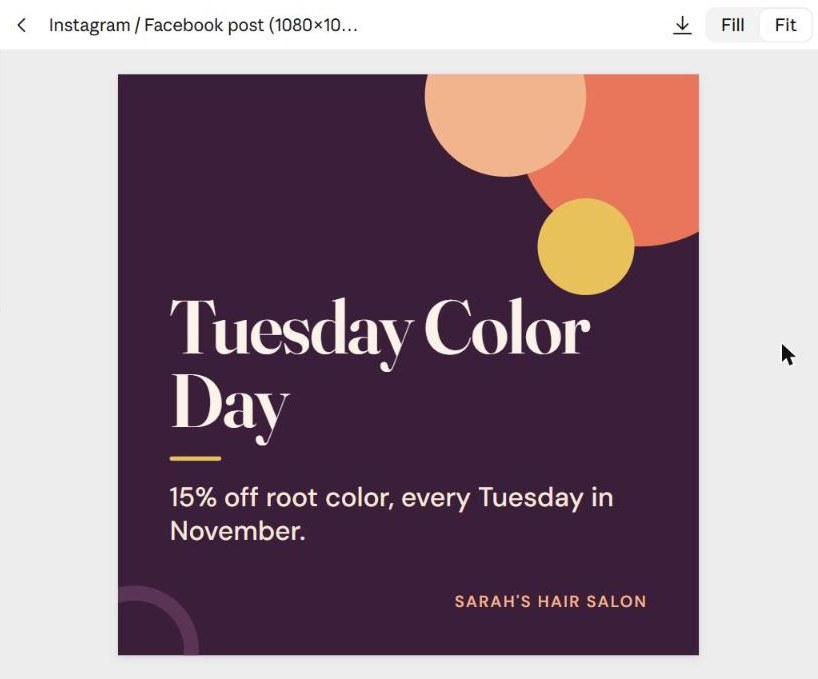
Want a change? Write to Claude underneath, like you would to a person: "Darker colors", "A bigger headline", "No orange circle".
Save it as an image
Two ways, depending on what you see. The simplest, and it works on every plan and every phone: take a screenshot of the card.
- On Android: press the power button and the volume down button together.
- On iPhone: press the side button and the volume up button together (iPhone with a Home button: Home and the side button).
- On a Windows computer: press the Windows key, Shift and S together, and drag over just the card with the mouse. The screenshot is copied: you can paste it straight into an email (Ctrl+V). To save it as a file, click the notification that pops up in the corner of the screen, then the save icon.
- On a Mac: press Command, Shift and 4 together, and drag over just the card. The screenshot is saved on your desktop.
On a phone, the screenshot captures the whole screen. Open it in your photos, tap Edit, then Crop, and drag the corners until only the card is left.
Is there a download button above the card (the arrow pointing down, mark 1)? Click it and choose PNG 1× (mark 2): that's a regular image. If you're asked whether to save it, choose to save.
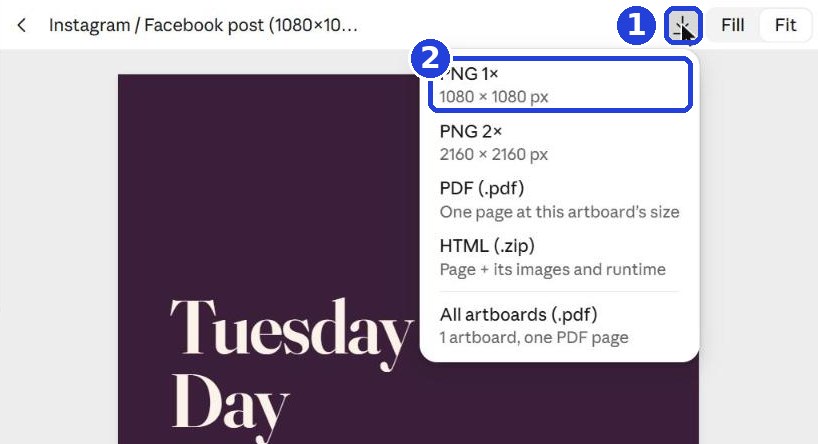
Then post it like any photo: on Instagram or Facebook, choose the image from your photos or the folder.
Want every prompt and file from all chapters in one place? The full pack, $1.99.
This page's PDF is free, for your email. The pack = every chapter and step, a one-time payment.
Today's task
Design one card for a real business announcement (an offer, new hours, a holiday), save it as an image, and post it this week.
Want this guide as a PDF to keep? Leave your email and we'll send it right away, plus the next step every morning.
The next step arrives tomorrow morning in your inbox.
We'll email you the PDF, then one step every morning, plus the next guides, tips and updates from Team in a Box. Unsubscribe anytime.
And for every prompt and file from all chapters in one place: the full pack, $1.99.
Don't want to wait?
All the steps, prompts and templates right now, in one place, ready to copy: $1.99.
Pay once. Yours for good, including everything we add.
Training material and tools, with no promise of income.
Secure payment through Polar. The link to the pack arrives right after payment, by email too. Full refund within 14 days.
More from this series
Your business's first website · Your first helper · All guides
Did this help? Share it with someone it will help, and get 50% of every purchase through you of one of our paid products (the full pack, the program or our done-for-you service): the ambassador program →